
Set up your clinic & branding
Add your clinic details, logo, and signature so every document you print looks like it came from you.
Steps
- Open Settings from the sidebar.
- Under "Doctor profile", fill in your full name, specialisation, qualifications, and registration number — the registration number and council are required before you can print a bill.
- Under "Hours", set your clinic name, phone, address, and UPI ID. The UPI ID is what powers the payment QR code on every bill — leave it blank and bills print without one.
- Set your consultation and follow-up fees so the Payment tab can auto-fill an amount later.
- Fill in your weekly working hours — leave a day blank to mark it closed.
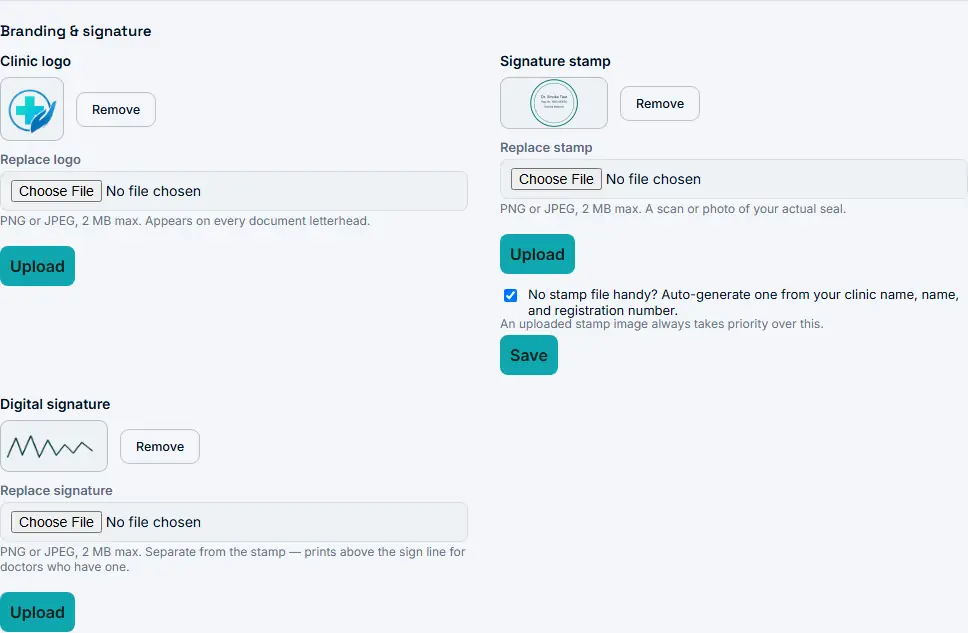
- Under "Branding & signature", upload your clinic logo (PNG or JPEG, 2 MB max). Until you do, documents use the default Clivera logo.
- Upload a signature stamp image, or turn on "Auto-generate one from your clinic name, name, and registration number" if you don’t have a scanned stamp handy.
- Optionally upload a separate digital signature — it prints above the sign line, distinct from the stamp.
Done when
Your logo and signature/stamp show up in the Branding & signature section instead of the placeholders, and Settings shows "Saved."
Talking points
- This is usually the very first screen you fill in with a new clinic — it takes under five minutes and immediately makes every printout look professional.
- Point out the auto-generated stamp option for doctors who don’t have a scanned seal handy — it removes a common blocker to going live on day one.
- The UPI ID field is the one thing to flag clearly: skip it and the doctor can still collect cash, they just won’t get a QR code on the bill until they add it.
Common objections
Does Clivera touch or hold any of the money?
No — the UPI ID here is the doctor’s own account. The QR just encodes a standard UPI payment link to it; Clivera never sits in the payment path.
What if the clinic doesn’t have a logo yet?
Everything renders fine with the default Clivera mark until they upload one — nothing blocks on branding being finished.